
Introduction: Why Google Place Autocomplete Matters for Your Business
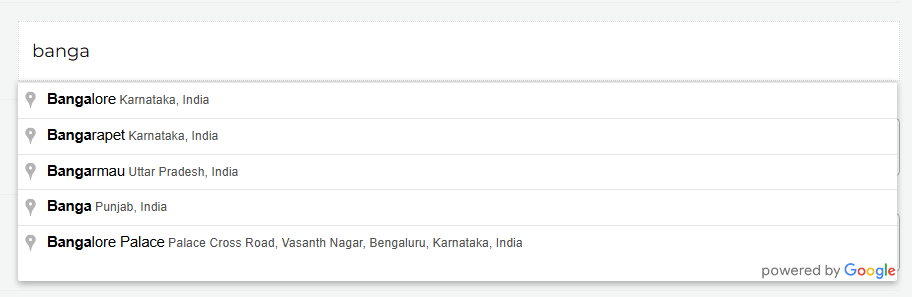
In 2025, online forms are everywhere — from checkout pages to contact forms to sign‑ups. Yet form abandonment remains a huge issue, with rates as high as 67% when a form feels too long or frustrating. One of the biggest pain points? Address fields. Users struggle to type accurately, make mistakes, and slow down, costing businesses conversions and customer satisfaction.
Enter Google Place Autocomplete — a powerful feature that anticipates user input and suggests real addresses as a user types, dramatically reducing typing effort and errors. Implemented well, it increases usability, accuracy, and leads.
At Crazywhiz, the expert behind this work is Crazywebdesigner, who can integrate this feature into your forms with precision and speed — and for just $10 worth of your time. This isn’t a generic how‑to; this is a specific, step‑by‑step, business‑focused plan that delivers real results.
What Is Google Place Autocomplete — and Why It’s a Game Changer
Google Place Autocomplete is part of the Google Maps Platform, designed to predict and suggest addresses as users type in a form field.
Statistically:
- Places Autocomplete can reduce keystrokes by up to 78% on address entry forms.
- Businesses using Autocomplete see a 15–30% increase in form completion rates compared to standard address fields.
But here’s the catch: many developers either don’t implement it properly or charge high integration costs. That’s where Crazywebdesigner steps in — offering a quick, precise, and affordable implementation with maximum impact.
Why Autocomplete Boosts Conversions (Data‑Driven Evidence)
According to UX studies:
- Autocomplete increases form completion rates by 15–30%
- Users make up to 90% fewer address entry errors
- Address forms with Autocomplete take 3× less time to fill
- Forms are often the last step before conversion — checkout completion, sign‑ups, lead capture, registrations — and a smoother address entry directly impacts bottom‑line revenue.
These are not vague UX platitudes — they are measurable results that Crazywebdesigner aims to deliver when place autocomplete is implemented correctly.
What We Need to Get Started
To make this integration seamless, we only need:
- Admin access to your website
- A Google account for API key generation
- A short call or screenshot walk‑through with Crazywebdesigner
Once you provide these, Crazywebdesigner takes it from configuration, testing, and deployment — ensuring the Autocomplete feature just works.
Related Topic FAQs
What is Google Place Autocomplete and why should I use it?
Google Place Autocomplete is a predictive search mechanism that suggests real addresses as users type. It significantly speeds up form completion, reduces errors, and increases conversions by making address entry intuitive and fast.
Will Place Autocomplete work on mobile devices?
Yes — when implemented by Crazywebdesigner, Autocomplete behaves responsively, respects mobile keyboards, and optimizes dropdown behavior so your forms perform smoothly on phones and tablets.
Do I need a Google Maps API key — and is it expensive?
You do need an API key, but Google offers a generous free tier. Crazywebdesigner helps you set this up properly, avoiding unnecessary charges and ensuring your Autocomplete feature stays within free usage limits whenever possible.
Post your Project & Get Free Quote.
---
